How to Verify a Doctor's License Online
A medical license is issued by a state licensing authority. The public record can help you confirm that you found the correct physician and review the license number, license type, status, expiration date, and any public board actions the state makes available.
Use DoctorLicenseLookup.com for a convenient first search. For a final or time-sensitive check, follow the result to the applicable state medical board. DoctorLicenseLookup is an independent website, not a government agency, and its records may not reflect a very recent state update.
Editorial note: DoctorLicenseLookup.com is an independent search platform that organizes publicly available licensing information. It is not a government agency or the final source for official verification. Available fields and update times vary by state. Confirm important information with the applicable state licensing authority.
What to Gather Before You Search
Start with as much identifying information as you can:
- The physician's first and last name
- The state where the physician practices or offers telehealth services
- The medical license number, if available
- A middle name or initial when the name is common
- Whether the physician is an MD or a DO, if known
A name alone may return several people. A license number is usually a better identifier, but license numbers are issued by states and may need to be paired with the issuing state. The same physician may also hold a different license number in each state.
Step-by-Step Doctor License Check
1. Search by name or license number
Open the doctor license search and choose the search method that matches the information you have.
- Search by name when you do not know the license number.
- Search by license number when it appears on a physician profile, prescription, or other professional document.
- Choose a state when possible to reduce incorrect matches.
If you are unsure how a number should be entered, see how to search using a medical license number.
2. Make sure you selected the right person
Do not rely on the name alone. Compare the record's state, license type, license number, middle initial, and other available professional details. Treat a mismatch as a reason to continue searching, not as evidence that someone is unlicensed.
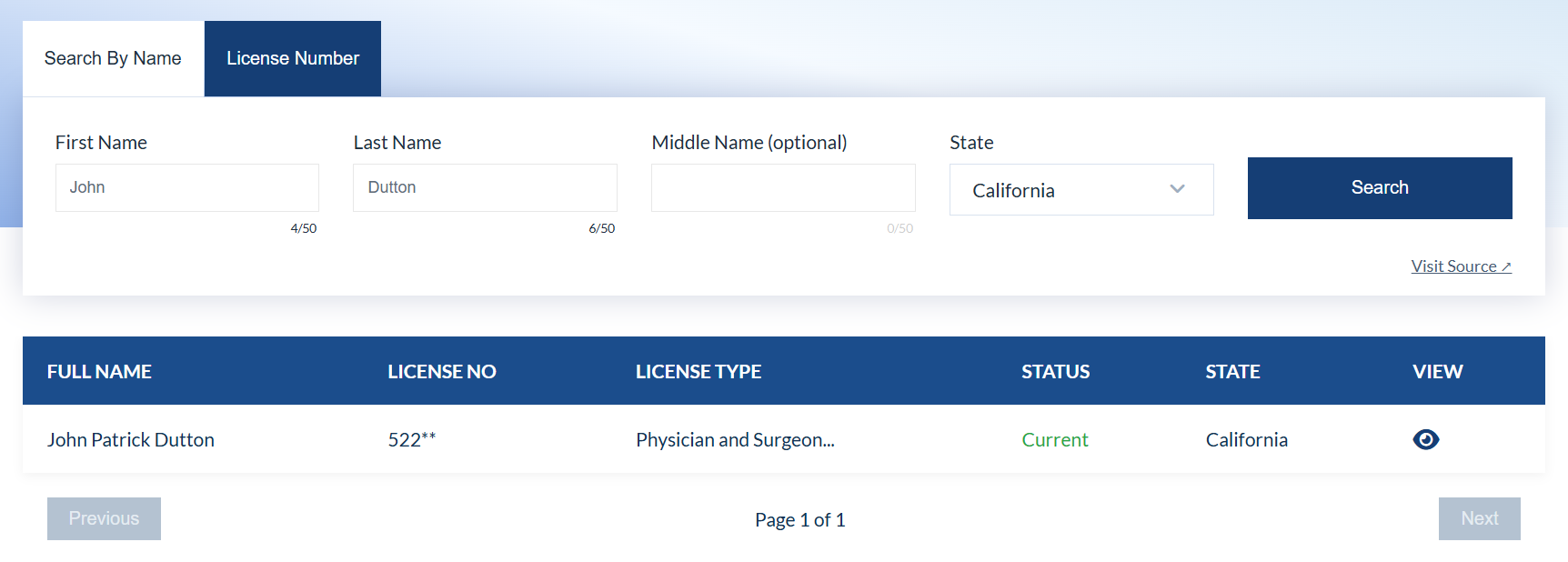
3. Read the license fields together
The fields shown differ by state and record. Common fields include:
| Field | What it can tell you | What to check |
|---|---|---|
| Name | The person attached to the record | Spelling, suffix, and middle initial |
| License number | The identifier assigned by the state | Match the complete number and issuing state |
| License type | The kind of authorization issued | MD, DO, training, temporary, limited, or another category |
| Status | The label currently supplied by the source | Read the state's definition and any conditions |
| Expiration date | The end of the current license period | Check it together with status and renewal information |
| Public actions | Final orders or restrictions the source publishes | Open the original board document when available |
An active label does not by itself describe specialty, board certification, competence, or the absence of restrictions. Likewise, an old or inactive record may be one of several licenses held by the same physician. See medical license statuses explained for a more detailed guide.
4. Open the detailed record
Use the detail link when one is available. Review the license type, status, issue and expiration dates, and source information. Some states publish more fields than others, so a blank field may mean that the source did not provide it.

5. Confirm important information with the state board
For official confirmation, use the DoctorLicenseLookup official boards directory or the FSMB state medical board directory. Search the same physician on the board's website and compare the license number and status.
State pages can also help you start with the correct jurisdiction. For example, use the California medical license lookup or Ohio medical license lookup, then follow the official-source link shown for that state.
If you are unsure which source answers your question, compare the best websites for checking a doctor's license and credentials.
What a License Lookup Does—and Does Not—Verify
A public license lookup is useful for checking licensure information. It does not answer every question about a physician.
A license lookup may show
- Current or historical license status
- License number and type
- Issue, renewal, or expiration dates
- Public restrictions or final board orders
- Other fields published by the particular state
A license lookup may not show
- Complete education or employment history
- Every complaint or pending investigation
- All malpractice claims or court cases
- Current hospital privileges
- Specialty board certification
- The most recent change if the source has not yet published or transferred it
The Federation of State Medical Boards explains that state physician profiles vary. Some include final disciplinary orders, malpractice information, convictions, training, or board certification; others publish fewer fields. A missing field should not be treated as a positive or negative finding without checking the state's own explanation.
Medical License Number, NPI, and Board Certification Are Different
These identifiers and credentials are often confused:
- A state medical license number identifies an authorization issued by a particular state.
- An NPI is a 10-digit federal identifier used in standard healthcare transactions. CMS states that an NPI does not ensure that a provider is licensed or credentialed.
- Board certification is a separate specialty credential. It can be checked through the applicable certification organization, such as ABMS Certification Matters or an osteopathic certifying board.
Confirm each item at its appropriate source. Do not use an NPI search as a substitute for a state license search. Read NPI number vs medical license number for a complete comparison.
What to Do If No Record Appears
A no-result search does not prove that a physician lacks a license. Try these steps:
- Check the spelling and remove punctuation.
- Try a former or alternate last name if you know one.
- Search with and without the middle initial.
- Search by license number and state.
- Check whether the physician is licensed under a different profession or license type.
- Search every state where the physician practices, including telehealth locations.
- Use the official state board's search or contact the board directly.
Recent approvals, renewals, and corrections may take time to appear in an independent database. The official board remains the appropriate place to resolve a missing or conflicting record. Read how often state medical boards update license records to understand source, publication, and collection dates.
If these steps do not resolve the search, follow the expanded guide to why a doctor may not appear in a license lookup.
How to Review Public Disciplinary Information
If a profile links to a public board action, open the original order and read its dates, findings, terms, and current status. A complaint is not the same as a final disciplinary order, and terminology differs among states. Our guide to checking physician disciplinary records explains those distinctions.
The National Practitioner Data Bank is not a public doctor-search service. The NPDB states that the general public cannot view individual practitioner reports; eligible organizations may query for authorized purposes, and practitioners may request their own reports.
Frequently Asked Questions
Is it free to check a doctor's license?
DoctorLicenseLookup offers a free public search. Many state boards also provide free online lookups, although a board may charge for a certified verification document or another formal service.
Does “active” mean there has never been discipline?
No. Status and disciplinary history are separate fields. An active license may have conditions or historical actions, depending on the state's terminology and current board order.
Should I search more than one state?
Yes, when a physician has practiced in more than one state or provides telehealth services across state lines. Each state issues and maintains its own license record. For a virtual appointment, use the separate process to verify a doctor's license for telehealth.
Can I use this search for an employment decision?
No. DoctorLicenseLookup is for informational use and is not a consumer reporting agency. Do not use its information for employment, credit, housing, insurance, or another decision governed by the Fair Credit Reporting Act. Organizations performing credentialing or employment screening should use sources and procedures appropriate to that purpose.
Start a Physician License Search
Search publicly available physician-license records by name or license number using DoctorLicenseLookup.com. Confirm important or time-sensitive information with the applicable state licensing authority.